Duckuments logo
secure document sharing

Secure Document Sharing for Files That Cannot Go Astray

You need to send a document quickly, but email attachments leave you guessing who opened it, where it went, and whether access should still exist tomorrow.

  • Replace uncontrolled attachments with secure links.
  • Use expiry, access checks, and download controls by default.
  • Track opens and downloads without slowing down the sender.
Secure Document Sharing with Duckuments

Buyer problem

Security-conscious teams, founders, finance teams, legal teams, and client-facing services.

The problem is not sharing. It is control after sharing.

Most sensitive documents start life in a sensible place: a finance folder, a client file, a case workspace, or an HR system. Risk appears when the document leaves that environment. A PDF sent as an attachment can be forwarded, downloaded, forgotten, or found months later in an inbox.

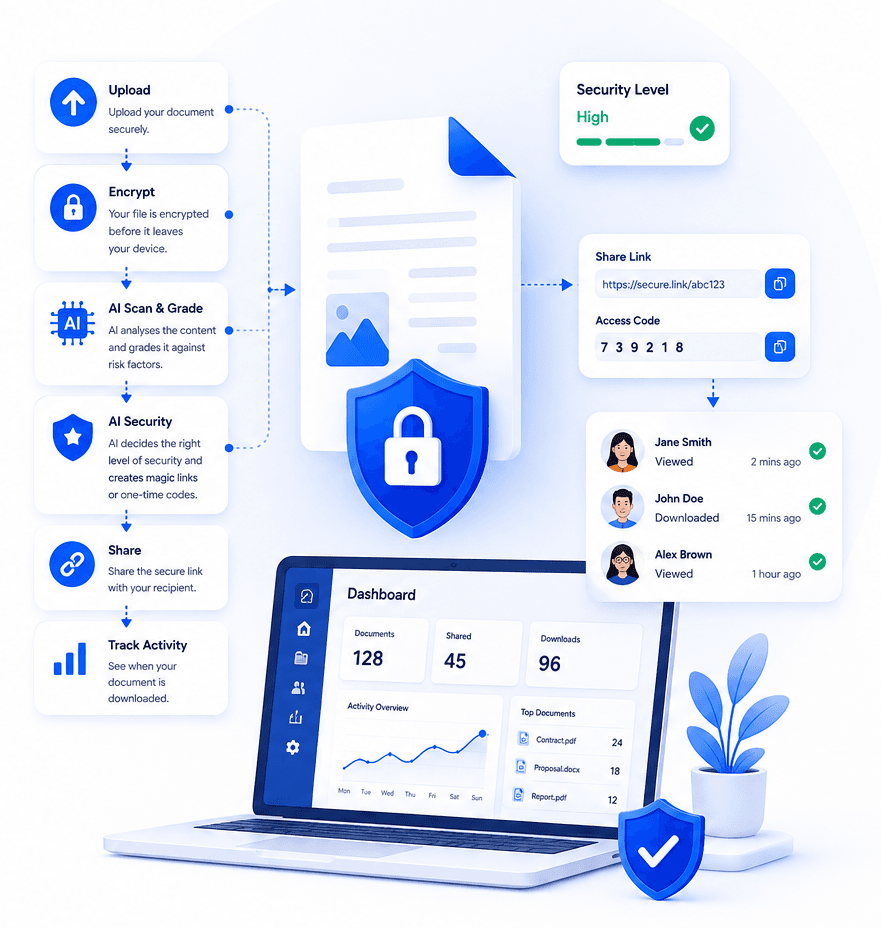
Duckuments gives teams a calmer way to send files. Upload the document, let the platform assess the content, then share a protected link with safeguards that match the sensitivity of the file.

What secure sharing should include

Secure document sharing should combine encryption, recipient access control, clear expiry rules, and visibility into what happened. The aim is not to add ceremony to every file transfer. The aim is to make the safer path the normal path.

For high-risk files, stronger controls such as one-time passwords and shorter availability windows help reduce exposure. For routine files, the experience stays quick and lightweight.

How Duckuments helps

Use Duckuments when a file needs to move, but accountability needs to stay with you.

Secure links

Send access-controlled links instead of permanent email attachments.

Expiry and limits

Reduce stale access with time-limited sharing and download controls.

Activity tracking

See when a recipient opens or downloads a document.

Put risk-aware sharing into practice

Upload a document, assess its sensitivity and share it with controls that fit the risk.

Start free

Frequently asked questions

What makes document sharing secure?

Secure document sharing uses encryption, controlled access, expiry rules, recipient checks, and activity tracking so a sender can manage risk after the file leaves their device.

Is secure document sharing different from cloud storage?

Cloud storage is useful for collaboration. Secure document sharing focuses on safely delivering specific files to specific recipients with controls around access, expiry, and visibility.

Related guides

Explore secure document workflows

Duckuments overview

Encrypted file sharing

Send encrypted files through secure links with recipient-friendly access, expiry controls, and visibility into document activity.

Document risk assessment

Use AI-powered document risk assessment to identify sensitive content and apply the right protection before sharing.

Client document portal

Give clients a secure way to send and receive sensitive documents without relying on risky inbox attachments.

AI document security

Use AI document security to detect sensitive content, assess risk, and apply practical safeguards before documents are shared.

For accountants

Help accounting firms send and receive tax records, statements, payroll files, and client documents through secure controlled links.

For law firms

Share legal documents, evidence, contracts, and client files with controlled access, expiry, tracking, and AI-powered risk assessment.

For HR

Send and receive HR documents such as contracts, right-to-work evidence, payroll files, medical notes, and employee records securely.

Send sensitive documents

Learn how to send sensitive documents securely with encrypted links, expiry, recipient checks, activity tracking, and AI-powered risk assessment.

GDPR document sharing

Practical guidance for GDPR-conscious document sharing with secure links, access controls, expiry, audit logs and AI risk assessment.

Client document sharing

Share client documents through secure links with recipient checks, expiry, activity visibility and AI-powered document risk assessment.

AI risk assessment

Assess document sensitivity with AI before sharing. Identify personal, financial, legal and confidential risk signals, then apply protection.

AI classification

Classify documents by sensitivity and risk with AI-assisted analysis, from personal data and financial details to confidential business content.

Security

See how Duckuments protects sensitive documents with encryption, secure links, recipient checks, expiry controls, audit logs, and AI-supported risk assessment.

Encryption

Learn how Duckuments uses encryption as part of a broader secure document sharing workflow with controlled links, expiry, and recipient checks.

Audit logs

Duckuments records document activity so teams can see uploads, sharing decisions, recipient access, downloads, and security-relevant events.

Data handling

Understand how Duckuments approaches sensitive document handling with secure upload, encrypted storage, controlled sharing, expiry, and deletion workflows.

AI usage/privacy

Duckuments uses AI to help assess document sensitivity while keeping the purpose practical: safer sharing decisions and appropriate safeguards.

GDPR file sharing

Share sensitive files through GDPR-conscious workflows with encryption, secure links, access controls, expiry, audit logs and AI risk assessment.

FAQs

Answers to common questions about Duckuments security, encryption, audit logs, AI document risk assessment, data handling, and compliance posture.

Start with one document

Share sensitive documents with more control

Duckuments helps you assess document risk, apply appropriate safeguards and keep visibility after sharing.

Start sharing documents securely