Duckuments logo
secure client document portal

A Secure Client Document Portal for Files Clients Actually Need to Send

Clients are asked to send evidence, statements, records, contracts, and IDs, but email leaves both sides with poor control and limited visibility.

  • Give clients a controlled route for sensitive files.
  • Reduce document chasing with clearer access status.
  • Protect client information with secure links and expiry.
Secure Client Document Portal with Duckuments

Buyer problem

Accountants, lawyers, consultants, brokers, advisers, and client service teams.

Client document exchange should feel professional

When a client sends sensitive information, the experience reflects on your business. Asking them to email passports, payslips, contracts, or tax records can feel casual for information that deserves care.

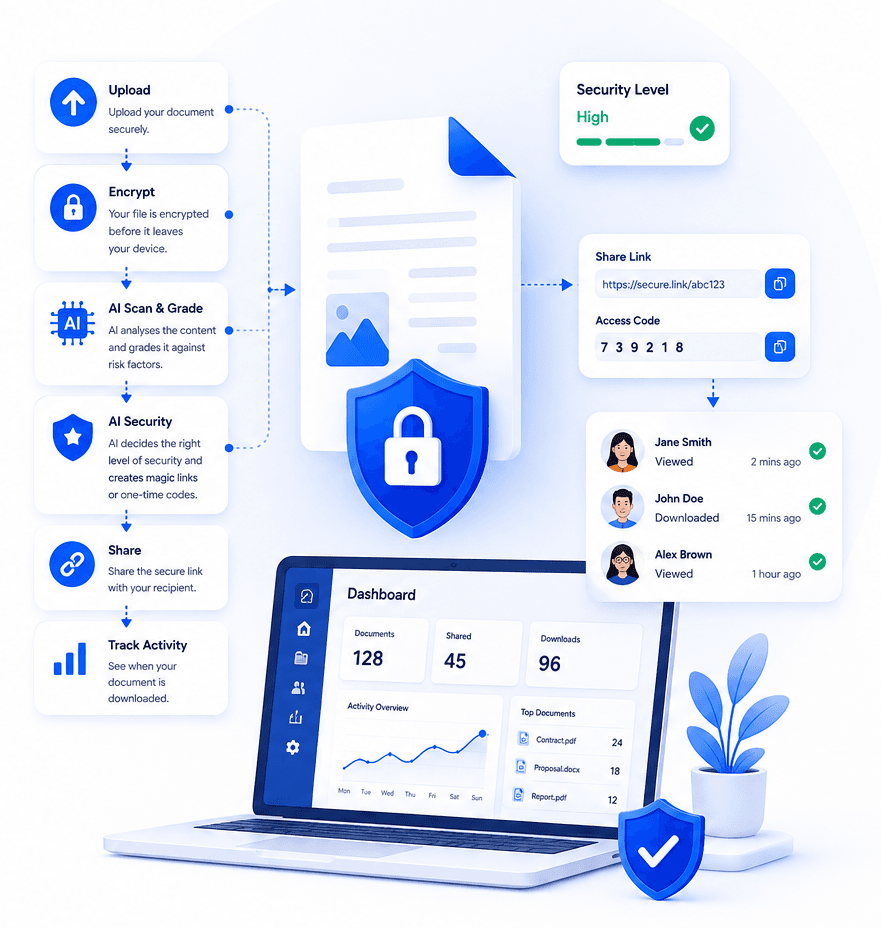
Duckuments helps client-facing teams create a safer exchange pattern: secure upload, controlled sharing, document tracking, and risk-aware protection.

A portal reduces confusion on both sides

A secure client document portal gives your team a single place to manage document delivery and receipt. It also helps clients understand that they are using the right channel for sensitive information.

Instead of hunting through threads for the latest attachment, teams can use secure links and activity records to see what has happened.

How Duckuments helps

Duckuments supports the client document moments where trust matters most.

Client-ready access

Send a secure link that is easier to control than an attachment.

Sensitive file handling

Apply stronger safeguards when clients upload higher-risk documents.

Delivery visibility

Know when documents have been accessed, instead of guessing from email replies.

Put risk-aware sharing into practice

Upload a document, assess its sensitivity and share it with controls that fit the risk.

Start free

Frequently asked questions

What is a secure client document portal?

It is a controlled online space or workflow where clients can send and receive sensitive files with safeguards such as encryption, secure links, expiry, and access tracking.

Do small firms need a client document portal?

Small firms often handle highly sensitive client information. A secure portal can improve trust and reduce the risk of unmanaged email attachments.

Related guides

Explore secure document workflows

Duckuments overview

Secure document sharing

Share confidential documents with controlled links, encryption, expiry rules, recipient verification, and audit-ready visibility.

Encrypted file sharing

Send encrypted files through secure links with recipient-friendly access, expiry controls, and visibility into document activity.

Document risk assessment

Use AI-powered document risk assessment to identify sensitive content and apply the right protection before sharing.

AI document security

Use AI document security to detect sensitive content, assess risk, and apply practical safeguards before documents are shared.

For accountants

Help accounting firms send and receive tax records, statements, payroll files, and client documents through secure controlled links.

For law firms

Share legal documents, evidence, contracts, and client files with controlled access, expiry, tracking, and AI-powered risk assessment.

For HR

Send and receive HR documents such as contracts, right-to-work evidence, payroll files, medical notes, and employee records securely.

Send sensitive documents

Learn how to send sensitive documents securely with encrypted links, expiry, recipient checks, activity tracking, and AI-powered risk assessment.

GDPR document sharing

Practical guidance for GDPR-conscious document sharing with secure links, access controls, expiry, audit logs and AI risk assessment.

Client document sharing

Share client documents through secure links with recipient checks, expiry, activity visibility and AI-powered document risk assessment.

AI risk assessment

Assess document sensitivity with AI before sharing. Identify personal, financial, legal and confidential risk signals, then apply protection.

AI classification

Classify documents by sensitivity and risk with AI-assisted analysis, from personal data and financial details to confidential business content.

Security

See how Duckuments protects sensitive documents with encryption, secure links, recipient checks, expiry controls, audit logs, and AI-supported risk assessment.

Encryption

Learn how Duckuments uses encryption as part of a broader secure document sharing workflow with controlled links, expiry, and recipient checks.

Audit logs

Duckuments records document activity so teams can see uploads, sharing decisions, recipient access, downloads, and security-relevant events.

Data handling

Understand how Duckuments approaches sensitive document handling with secure upload, encrypted storage, controlled sharing, expiry, and deletion workflows.

AI usage/privacy

Duckuments uses AI to help assess document sensitivity while keeping the purpose practical: safer sharing decisions and appropriate safeguards.

GDPR file sharing

Share sensitive files through GDPR-conscious workflows with encryption, secure links, access controls, expiry, audit logs and AI risk assessment.

FAQs

Answers to common questions about Duckuments security, encryption, audit logs, AI document risk assessment, data handling, and compliance posture.

Start with one document

Share sensitive documents with more control

Duckuments helps you assess document risk, apply appropriate safeguards and keep visibility after sharing.

Create a safer client document flow