Duckuments logo
AI document security

AI Document Security That Helps People Make Safer Sharing Decisions

Security controls often rely on senders noticing every sensitive detail in a file. AI can help surface risks before a mistake leaves the business.

  • Analyse document contents for sensitivity signals.
  • Recommend stronger protection when risk is higher.
  • Give senders useful context at the point of sharing.
AI Document Security with Duckuments

Buyer problem

Teams that want smarter document protection without adding heavy manual review to every send.

AI makes document security more contextual

Traditional rules can treat all files alike. AI document security can inspect the document itself and identify signals that the file may require extra protection: personal data, account details, legal references, financial figures, or confidential business material.

That context helps teams avoid the two common extremes: over-protecting every routine file or under-protecting documents that quietly contain sensitive information.

The best AI security is practical

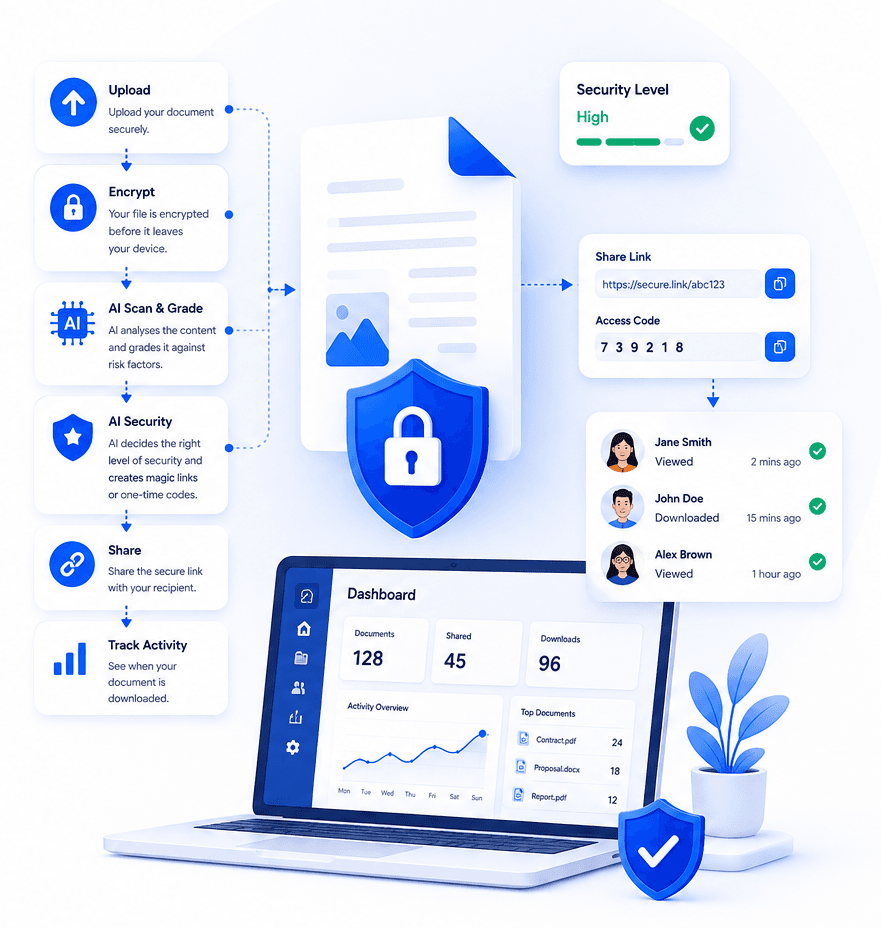
Duckuments uses AI to support the user's decision at the moment of sharing. It is designed to turn document analysis into concrete safeguards, such as stronger access checks, shorter expiry windows, or tighter download handling.

The result is not abstract insight. It is safer everyday document movement.

How Duckuments helps

Duckuments brings AI into the document workflow where it can reduce real-world mistakes.

Sensitivity detection

Identify content that may need stronger protection.

Risk-aware sharing

Use AI findings to inform expiry, OTP, and link controls.

Sender guidance

Help non-specialists understand why a file may need extra care.

Put risk-aware sharing into practice

Upload a document, assess its sensitivity and share it with controls that fit the risk.

Start free

Frequently asked questions

How does AI improve document security?

AI can help review document content for sensitivity signals and suggest stronger controls before the file is shared.

Is AI document security only for large companies?

No. Smaller teams often lack dedicated security review, so AI-supported guidance can be especially helpful for everyday sensitive document handling.

Related guides

Explore secure document workflows

Duckuments overview

Secure document sharing

Share confidential documents with controlled links, encryption, expiry rules, recipient verification, and audit-ready visibility.

Encrypted file sharing

Send encrypted files through secure links with recipient-friendly access, expiry controls, and visibility into document activity.

Document risk assessment

Use AI-powered document risk assessment to identify sensitive content and apply the right protection before sharing.

Client document portal

Give clients a secure way to send and receive sensitive documents without relying on risky inbox attachments.

For accountants

Help accounting firms send and receive tax records, statements, payroll files, and client documents through secure controlled links.

For law firms

Share legal documents, evidence, contracts, and client files with controlled access, expiry, tracking, and AI-powered risk assessment.

For HR

Send and receive HR documents such as contracts, right-to-work evidence, payroll files, medical notes, and employee records securely.

Send sensitive documents

Learn how to send sensitive documents securely with encrypted links, expiry, recipient checks, activity tracking, and AI-powered risk assessment.

GDPR document sharing

Practical guidance for GDPR-conscious document sharing with secure links, access controls, expiry, audit logs and AI risk assessment.

Client document sharing

Share client documents through secure links with recipient checks, expiry, activity visibility and AI-powered document risk assessment.

AI risk assessment

Assess document sensitivity with AI before sharing. Identify personal, financial, legal and confidential risk signals, then apply protection.

AI classification

Classify documents by sensitivity and risk with AI-assisted analysis, from personal data and financial details to confidential business content.

Security

See how Duckuments protects sensitive documents with encryption, secure links, recipient checks, expiry controls, audit logs, and AI-supported risk assessment.

Encryption

Learn how Duckuments uses encryption as part of a broader secure document sharing workflow with controlled links, expiry, and recipient checks.

Audit logs

Duckuments records document activity so teams can see uploads, sharing decisions, recipient access, downloads, and security-relevant events.

Data handling

Understand how Duckuments approaches sensitive document handling with secure upload, encrypted storage, controlled sharing, expiry, and deletion workflows.

AI usage/privacy

Duckuments uses AI to help assess document sensitivity while keeping the purpose practical: safer sharing decisions and appropriate safeguards.

GDPR file sharing

Share sensitive files through GDPR-conscious workflows with encryption, secure links, access controls, expiry, audit logs and AI risk assessment.

FAQs

Answers to common questions about Duckuments security, encryption, audit logs, AI document risk assessment, data handling, and compliance posture.

Start with one document

Share sensitive documents with more control

Duckuments helps you assess document risk, apply appropriate safeguards and keep visibility after sharing.

Use AI to protect documents