Duckuments logo
document data handling

Data Handling Designed for Documents People Should Not Treat Casually

Sensitive documents need a considered handling path from upload to access, expiry, deletion, and account closure.

  • Handle sensitive files through a controlled workflow.
  • Use expiry and deletion to reduce stale document access.
  • Support account and document lifecycle management.
Data Handling with Duckuments

Buyer problem

Teams that want a clearer operational approach to sensitive document handling.

Good data handling is about the whole lifecycle

A sensitive document is not only at risk when it is uploaded. Risk can appear during analysis, storage, sharing, recipient access, download, expiry, and deletion. Duckuments is designed around that full lifecycle.

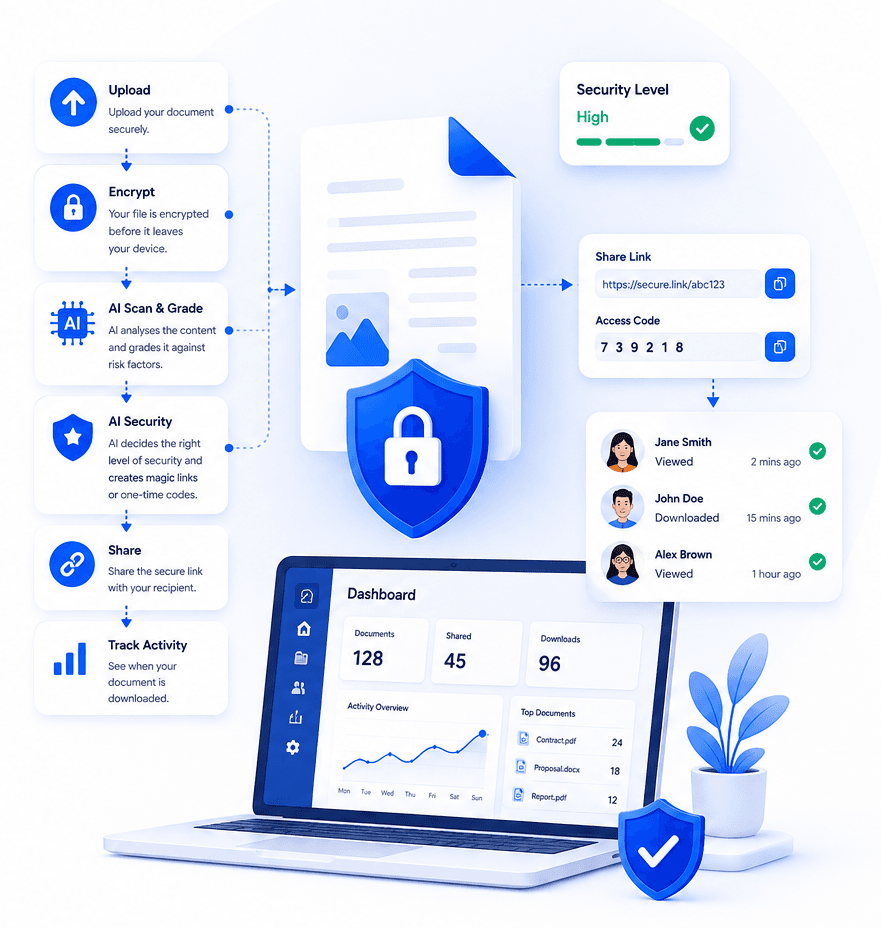
The platform supports secure upload, encrypted storage, AI-assisted risk assessment, controlled sharing links, recipient verification where needed, document expiry, and cleanup of expired files.

Less stale access means less avoidable exposure

Many document problems come from old access that no one meant to keep. Files remain in inboxes, shared folders, and message threads long after the business need has passed.

Duckuments helps teams reduce that exposure by treating documents as time-bound shares rather than permanent attachments. Account deregistration and deletion workflows also support cleaner lifecycle management.

How Duckuments helps

Duckuments gives sensitive files a safer route through the business.

Controlled upload

Bring documents into a secure workflow before they are shared.

Expiry by design

Limit how long access remains available for shared files.

Lifecycle controls

Support cleanup, deletion, and account deregistration workflows.

Put risk-aware sharing into practice

Upload a document, assess its sensitivity and share it with controls that fit the risk.

Start free

Frequently asked questions

What does data handling mean for document sharing?

It means controlling how documents are uploaded, analysed, stored, accessed, shared, expired, and deleted.

Why is expiry important?

Expiry reduces the chance that an old link or stale document remains accessible after the original business need has passed.

Related guides

Explore secure document workflows

Duckuments overview

Secure document sharing

Share confidential documents with controlled links, encryption, expiry rules, recipient verification, and audit-ready visibility.

Encrypted file sharing

Send encrypted files through secure links with recipient-friendly access, expiry controls, and visibility into document activity.

Document risk assessment

Use AI-powered document risk assessment to identify sensitive content and apply the right protection before sharing.

Client document portal

Give clients a secure way to send and receive sensitive documents without relying on risky inbox attachments.

AI document security

Use AI document security to detect sensitive content, assess risk, and apply practical safeguards before documents are shared.

For accountants

Help accounting firms send and receive tax records, statements, payroll files, and client documents through secure controlled links.

For law firms

Share legal documents, evidence, contracts, and client files with controlled access, expiry, tracking, and AI-powered risk assessment.

For HR

Send and receive HR documents such as contracts, right-to-work evidence, payroll files, medical notes, and employee records securely.

Send sensitive documents

Learn how to send sensitive documents securely with encrypted links, expiry, recipient checks, activity tracking, and AI-powered risk assessment.

GDPR document sharing

Practical guidance for GDPR-conscious document sharing with secure links, access controls, expiry, audit logs and AI risk assessment.

Client document sharing

Share client documents through secure links with recipient checks, expiry, activity visibility and AI-powered document risk assessment.

AI risk assessment

Assess document sensitivity with AI before sharing. Identify personal, financial, legal and confidential risk signals, then apply protection.

AI classification

Classify documents by sensitivity and risk with AI-assisted analysis, from personal data and financial details to confidential business content.

Security

See how Duckuments protects sensitive documents with encryption, secure links, recipient checks, expiry controls, audit logs, and AI-supported risk assessment.

Encryption

Learn how Duckuments uses encryption as part of a broader secure document sharing workflow with controlled links, expiry, and recipient checks.

Audit logs

Duckuments records document activity so teams can see uploads, sharing decisions, recipient access, downloads, and security-relevant events.

AI usage/privacy

Duckuments uses AI to help assess document sensitivity while keeping the purpose practical: safer sharing decisions and appropriate safeguards.

GDPR file sharing

Share sensitive files through GDPR-conscious workflows with encryption, secure links, access controls, expiry, audit logs and AI risk assessment.

FAQs

Answers to common questions about Duckuments security, encryption, audit logs, AI document risk assessment, data handling, and compliance posture.

Start with one document

Share sensitive documents with more control

Duckuments helps you assess document risk, apply appropriate safeguards and keep visibility after sharing.

Handle documents securely