Duckuments logo
document encryption

Encryption for Sensitive Files Before, During, and After Sharing

Encryption matters, but teams also need to control who can access a document and how long that access should remain available.

  • Protect uploaded files while they are stored.
  • Share access through secure links rather than loose copies.
  • Combine encryption with expiry, verification, and activity tracking.
Encryption with Duckuments

Buyer problem

Businesses sending sensitive documents that need more control than ordinary email attachments.

Encryption is the baseline for trust

Sensitive documents deserve protection beyond a familiar file name and a hope that they reach the right person. Duckuments encrypts uploaded files so the document is not simply sitting around as plain, unmanaged data.

That foundation is especially important for files containing personal data, financial records, legal documents, HR information, or commercial material that could cause harm if exposed.

Encrypted sharing still needs control

Encryption protects the file, but it does not answer every practical question. Who should open it? Should access expire? Should the recipient need an extra check? Should the sender be able to see whether it was downloaded?

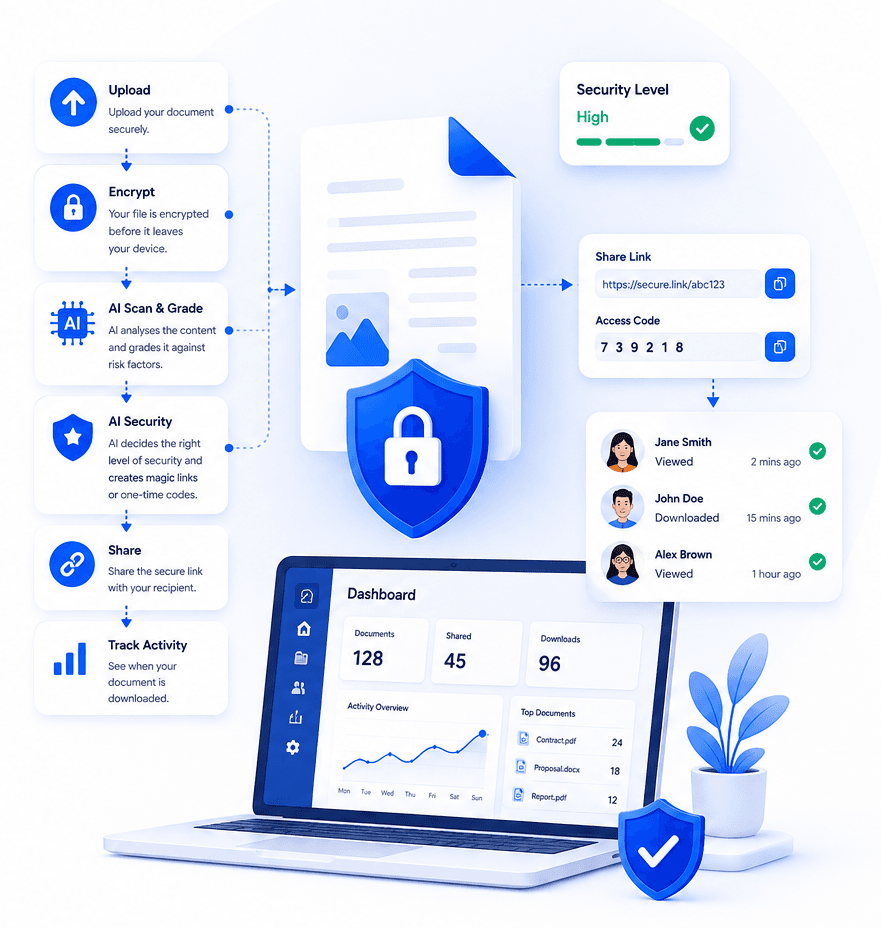
Duckuments treats encryption as one part of a complete sharing workflow, pairing it with secure tokens, controlled access, document expiry, and audit-ready activity records.

How Duckuments helps

Duckuments uses encryption alongside the controls senders actually need.

Encrypted storage

Uploaded documents are protected while held by the platform.

Secure delivery

Recipients use controlled links instead of receiving unmanaged attachments.

Layered safeguards

Add expiry, OTP checks, and download limits when a document carries higher risk.

Put risk-aware sharing into practice

Upload a document, assess its sensitivity and share it with controls that fit the risk.

Start free

Frequently asked questions

Is encryption enough on its own?

Encryption is essential, but sensitive sharing also benefits from access controls, expiry, recipient verification, and audit logs.

Why does Duckuments use secure links?

Secure links make it easier to control access after sharing. They avoid sending a permanent document copy directly into an email thread.

Related guides

Explore secure document workflows

Duckuments overview

Secure document sharing

Share confidential documents with controlled links, encryption, expiry rules, recipient verification, and audit-ready visibility.

Encrypted file sharing

Send encrypted files through secure links with recipient-friendly access, expiry controls, and visibility into document activity.

Document risk assessment

Use AI-powered document risk assessment to identify sensitive content and apply the right protection before sharing.

Client document portal

Give clients a secure way to send and receive sensitive documents without relying on risky inbox attachments.

AI document security

Use AI document security to detect sensitive content, assess risk, and apply practical safeguards before documents are shared.

For accountants

Help accounting firms send and receive tax records, statements, payroll files, and client documents through secure controlled links.

For law firms

Share legal documents, evidence, contracts, and client files with controlled access, expiry, tracking, and AI-powered risk assessment.

For HR

Send and receive HR documents such as contracts, right-to-work evidence, payroll files, medical notes, and employee records securely.

Send sensitive documents

Learn how to send sensitive documents securely with encrypted links, expiry, recipient checks, activity tracking, and AI-powered risk assessment.

GDPR document sharing

Practical guidance for GDPR-conscious document sharing with secure links, access controls, expiry, audit logs and AI risk assessment.

Client document sharing

Share client documents through secure links with recipient checks, expiry, activity visibility and AI-powered document risk assessment.

AI risk assessment

Assess document sensitivity with AI before sharing. Identify personal, financial, legal and confidential risk signals, then apply protection.

AI classification

Classify documents by sensitivity and risk with AI-assisted analysis, from personal data and financial details to confidential business content.

Security

See how Duckuments protects sensitive documents with encryption, secure links, recipient checks, expiry controls, audit logs, and AI-supported risk assessment.

Audit logs

Duckuments records document activity so teams can see uploads, sharing decisions, recipient access, downloads, and security-relevant events.

Data handling

Understand how Duckuments approaches sensitive document handling with secure upload, encrypted storage, controlled sharing, expiry, and deletion workflows.

AI usage/privacy

Duckuments uses AI to help assess document sensitivity while keeping the purpose practical: safer sharing decisions and appropriate safeguards.

GDPR file sharing

Share sensitive files through GDPR-conscious workflows with encryption, secure links, access controls, expiry, audit logs and AI risk assessment.

FAQs

Answers to common questions about Duckuments security, encryption, audit logs, AI document risk assessment, data handling, and compliance posture.

Start with one document

Share sensitive documents with more control

Duckuments helps you assess document risk, apply appropriate safeguards and keep visibility after sharing.

Share encrypted files